The Square - College Intranet#
THE SQUARE WC1#
The Square, https://square.goodenough.ac.uk is the heart of the Goodenough Community. It’s the place to go to find out about College events, the Members’ Council, upcoming activities and College societies.
All Members are encouraged to login to the Square regularly and should check the site every day for news, events and the weekly lunch and dinner menus plus other information, including the College events calendar.
Members are required to keep their details up to date.


The Square can be accessed via a browser on a computer or tablet. An app is also available for Android and Apple phones.
Logging In To The Square#
Go to https://square.goodenough.ac.uk/login
When you see the login page (shown on the next page of this guide,) enter your Windows Username (G Number) and Password to login to the Square.
Login to The Square#
Enter your G Number and password to login#
□ komeone@example.com □ Password
Sign in#
Help#
Members should login with their G Number eg G1834567 Staff should login with their Username eg fred.smith
Forgotten your password?#
Click to reset password#
HELP!! » Contact the IT Helpdesk#
As the Square is a responsive website, it looks a little different if viewed on a phone. When viewed on a phone, the Login Screen looks like this:
GOODENOUGH COLLEGE
Login to The Square#
Enter your G Number and password to login#
G9999993#
……..#
Sign in
Help#
Members should login with their G Number eg G1834567 Staff should login with their Username eg fred.smith
Forgotten your password?#
Click to reset password
HELP!! » Contact the IT Helpdesk#
Events organised by the College are advertised here along with important notices like maintenance updates and policy changes.
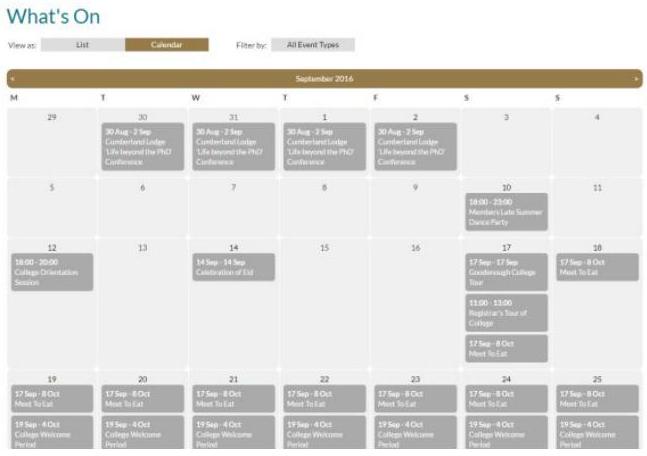
The Square allows you to join clubs and societies, check What’s On and buy tickets.
The What’s On page where you can see the latest events as either a list or in a calendar view.
Example Members’ Profile#
All Members have their own personal profile. From there you can access Clubs & Societies, set contact preferences as well as viewing your purchasing history and previous messages.
My Profile#

Buffy Puggle#
About Me
Clubs & Societies#
ED IT Department 55. Self Preservation Society 5. Goodenough Walkies Society 50. Cuteness Society 5. Puppy Cuddling Club 8. Cat-Chasing Society
Barking and Stratford Club
Messages#
- Updating your Club or Society Page on the New Square
- Updating your Club or Society Page on the New Square
TEST to Square test community and the dynamic lists (just adjusted the
- membership requirements on these)
圖TEST EMAIL to Square Community
- Test message from The Square cl. View Inbox ⇒ Send Message
The Square - Goodenough Square App#
The Square is available via the Goodenough Square App. You can download it from Google Play and the Apple App Store.
Go to the store for your device and search for “Goodenough”, “The Square - Goodenough” or “The Square” to find the App.
iPad & iPhone

The Square Goodenough Lifestyle
Apps#
Apps#
goodenough| Search Android apps
Once you have located and installed the “The Square - Goodenough” app, open it and choose “The Square, Goodenough”.

The Square - Goodenough#
Goodenough College
MSL Membership Solutions Ltd#
Designed for iPad
Free


Square App Registration#
Please enter your Square username This is the G-number on your Goodcard G-number
Submit
I need help
Enter your G-number and then click submit. You will be sent an email containing a link to complete your registration.
Open this email on the device where you have installed the app.
Square App Registration#
Thanks! We sent an invite to leon***@goodenough.ac.uk. Please open the invite email and follow the instructions there.
Try again I have a code
I need help
When you click the link in the email, you will see a message asking if you would like to Open in The Square?
Select Open and you will see the Complete Registration page.
Open in “The Square”?
Cancel Open
Complete Registration#
Complete your registration by entering the information below.
Mobile number Please enter your mobile phone nu… PIN Enter a PIN Confirm PIN Confirm your PIN Submit
I need help Try again
Enter a phone number (it doesn’t have to be a mobile phone number) and create a PIN to complete the registration process.
The app will load The Square homepage. You are now logged in to The Square App.
Acceptable Use#
By using The Square and The Square App, all users are agreeing to follow the Terms and Conditions of use and the Acceptable Use Policy. (See Terms and Conditions and Acceptable Use at the end of this Guide.)